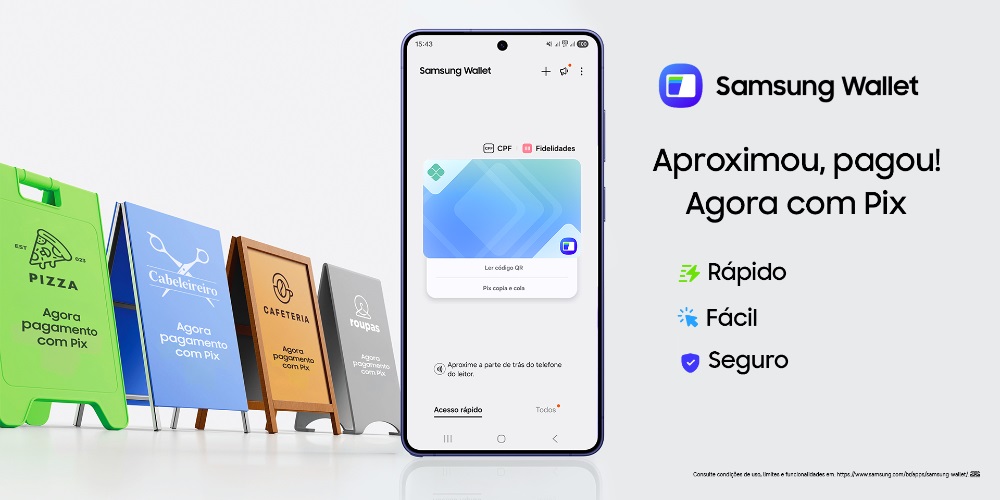
New feature allows you to make payments via Pix using contactless technology, without needing to open your bank’s app.
Samsung announced the arrival of Pix, by proximity, to Samsung Wallet starting this Friday (17). The integration allows Galaxy users to make payments via Pix by proximity, „quickly and securely”, removing common steps such as switching views between different applications.
„The new feature aims to simplify the daily lives of Brazilians by integrating the country’s main payment method with the centralized and secure experience of Samsung Wallet , which also includes credit and debit cards, keys, and digital credentials – all protected by biometric locking and Samsung Knox. In addition to speed and convenience , the platform maintains the benefits of the Samsung Rewards program, allowing people to accumulate points on their purchases.” – according to the press release.
“Pix has become an essential part of Brazilians’ daily lives. By integrating it with Samsung Wallet, we are simplifying access to payments and bringing together, in a single secure environment, functionalities that are already part of people’s daily lives,” explains Alexandre Magno, Senior Director of Mobile Experience Product at Samsung Brazil.
The integration of Pix into Samsung Wallet will happen gradually, starting this Friday (17), until April 22, 2026. It is possible to use Pix in Samsung Wallet with financial institutions that are part of the Central Bank of Brazil’s Open Finance.
How does Pix work in Samsung Wallet?
Before making contactless payments via Pix in Samsung Wallet, you need to link an account from a bank listed in the app. To do this:
. Open the Samsung Wallet app and tap “Add” or “+”.
. Select the “Pix” option.
. Tap on “Link a bank account”
. Add your CPF (Brazilian tax identification number), select the bank, and tap „Continue”.
. You will be redirected to the selected bank’s app. This is the only time you need to use the bank’s app.
. Authorize the use of Pix in your bank’s app. You can also set the maximum transaction limit per Pix transaction in Samsung Wallet.
After registering an account, Samsung Wallet users can pay via Pix in the following ways:
. Pix via proximity: swipe up on the home screen to open Samsung Wallet, select the linked Pix account you want to use, and bring your phone close to the merchant’s payment terminal. Confirm your details and enter your fingerprint or PIN to complete the transaction via Pix. Even if the terminal displays a QR code, it’s not necessary to use it – simply bring your smartphone close to the device.
. Paying Pix via QR code using your Galaxy camera: Open your Galaxy smartphone’s camera, point it at the QR code, and tap „QR Code for Pix”. Confirm your details and enter your fingerprint or PIN to complete the transaction via Pix.
. Pix via QR Code in Samsung Wallet: swipe up on the home screen to open Samsung Wallet, choose your Pix account. Select “Read QR Code” and point your cursor at the QR code. Confirm your details and enter your fingerprint or PIN to complete the transaction via Pix.
. Pix copy and paste: swipe up on the home screen to open Samsung Wallet, choose your Pix account. Select “Pix copy and paste” and paste the previously copied Pix code. Confirm your details and enter your fingerprint or PIN to complete the transaction via Pix.
Benefits and features of Samsung Wallet
Samsung Wallet is Samsung’s digital wallet that brings together, in a single application, different everyday functionalities, such as contactless payments via Samsung Pay, password management with Samsung Pass, and access to Samsung Rewards, a benefits program that accumulates points for up to 30 payments per month. Accumulated points can be redeemed for discounts and benefits at official Samsung and partner channels.
The solution allows you to store credit and debit cards, loyalty cards, tickets, digital keys on your smartphone and, now, link bank accounts for payment via Pix, all with convenience and practicality.





Banking 4.0 – „how was the experience for you”
„To be honest I think that Sinaia, your conference, is much better then Davos.”
Many more interesting quotes in the video below: